

#OneMessage
Overview
About
Duration. 10 week
Project Type. Course Project
Role. UI Designer + UX Researcher + Prototyping
Tool. Figma, pencil, pen
OneMessage was created to assist everyone who uses multiple social media platforms and prodcutivity apps to manage their messages on just 1 platform. I worked as the UX researcher to find out user's need and to design an UI that tackles all the needs. In the end, we made an interactive prototype which was awarded as one of the top 3 presentations of the course.


47%
miss 3-5 IMPORTANT message in the past 3 months
95%
either sometimes or always forgets to respond
80%
spend more than 3 hours a day on messaging services
Competitive Analysis
To start off, we conducted a competitive analysis to see whether our project idea is feasible and how is our competition.
My role. This is a team effort. Each of us researched one service that performs integration or messaging feature.
Result.
-
There is only 1 service, Frantz, that performs the same objective as our project.
-
Find the strength of Frantz, 1) easy navigation between apps, 2) similar messaging UI for the original apps, 3) focus on both professional and personal usage
-
Figure the attack point of Frantz 1) Not free, 2) only on desktop
User Survey
To align our features with actual user needs, we created a survey with Google Form to understand our potential user's messaging habits, apps usage, and motivation.
My role. Lauren took the leadership of this part, she created the form while the rest of us suggest questions to include. I contributed to the distribution of the survey. I send the survey to the student Facebook group and professional community in order to reach our targeted audience.
Result.
-
Narrow down the apps to integrate
-
Focus the main use cases

Result
The project was successfully delivered much prior the deadline and with all internded function. Our team was also awarded The Best Sale Pitch and the Top3 presentation among the entire course of 20 groups.
In future, we scheduled usability test and is looking forward for the development of the app.
Reflections
Design can't be done in the first iteration. Design requires multiple iterations to configure the team thoughts. It requries a lot of communication and changes. There is no one-time success.
Dream Big BUT trim it down. Our project started with a really ambitious thought to have desktop and mobile version. However, the scope was too big to implement, so we decided to trim it down to the mobile application. We also learnt from an expert that it is good to dream big for all the functions then started small and had hard time to make it bigger. We saved the other part to nice to have and leave it for future development. This ensures a possible future for the app.
Learn ALL the time. I am not a Figma expert before this project, I only used a few time and has not been in charge of a design fully on my own. I learnt to be open for any opportunity of learning. We won't know every tool, but as we are willing to learn, nothing can be impossible.
Design Process
-
Empathize. Competitive Analysis && Survey
-
Define. User Persona && Storyboard
-
Ideate. Sketches
-
Build. Mock-up && Design Decisions
-
Reflect. Reflection && Result

Brainstorm
We all have at least 3 application (either on phone or laptop) that contains a messaging feature. To keep connected and maintain communication, we have to constantly check these different apps to make sure you do not miss any new information. However, there are too many of them.
The Problem
How can we ensure not missing a message and manage all the messages together?
The Goal
An application/system that can sync messages between different platforms (discord, slacks, messenger, etc…) so users only need to use one application and will be able to access all messages.

Research

Define

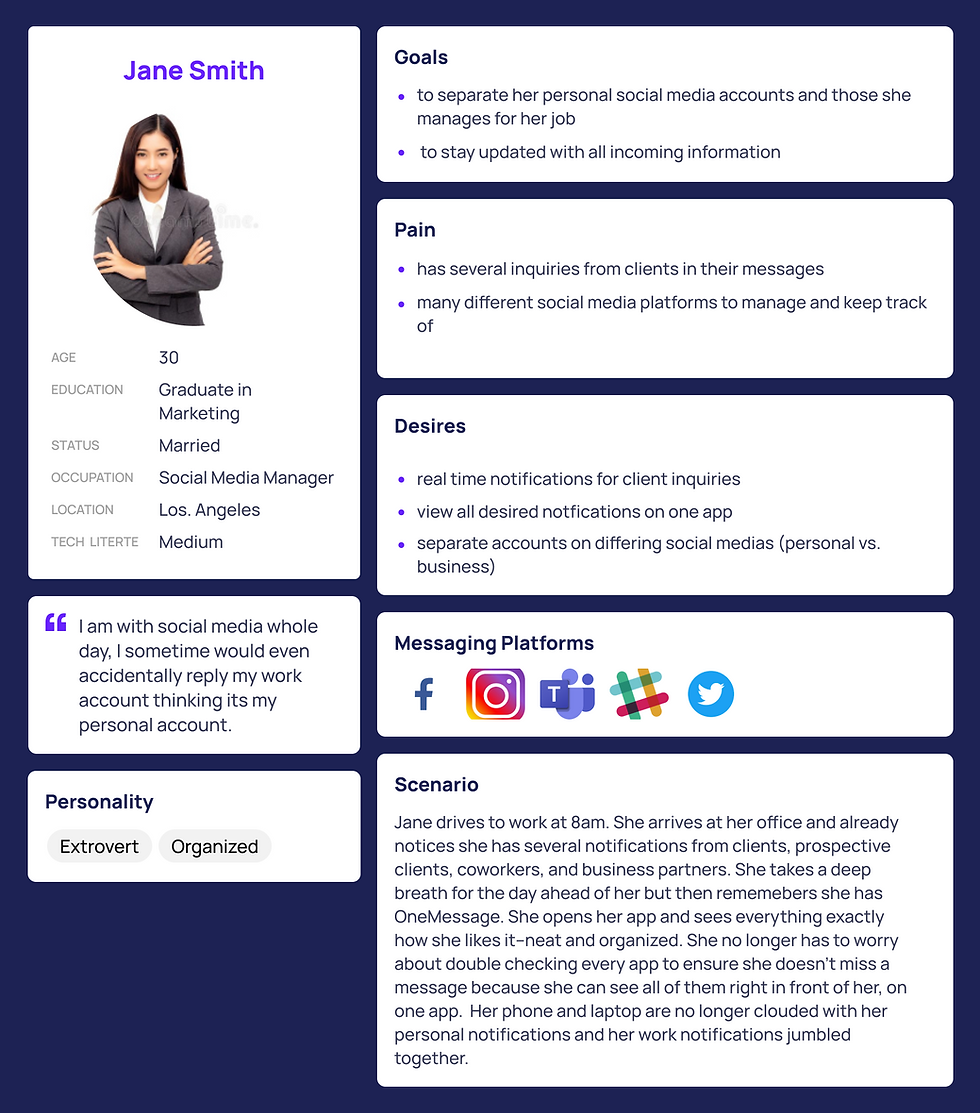
Persona
Based on our user survey, we created our persona to represent our users. We made 2 persona. Jane Smith represents our professional users ; and Jimmy Smith represents our regular users.
My role. Team create the persona details together. I was in charge of the visualization.

Ideate
Sketches
After understanding our user, we start to envision how will our app function and what does it look like. Here are the initial sketches from the team


Result. Function to have
-
Navigation between apps
-
set priority of message
-
notification and reminders
-
groups of apps for separate usage (such as persona and work)
As switching between apps is our main feature, I made two variation of the mock-up for the team to decide which will be more intiutive for our users.
Result. We decided to go with the version 2, to have sidebar navigation as the main design.
Design Decision

Version 1 is to swtich between app as like how we switch on phone OS, you can see overview of the app.
Downside: If there are a lot of apps, you will have to slide for a long time
(bad UX)
have a home tab bar
Switch with side bar
Version 2 doesn't have a tab bar (to have more space for the messages). Instead of having preview of individual app, have the message labled with app's icon

Build
Having the major design decision made, we started iterations of our UI design. I was in charge of the UI design. I would make the interface and request for feedback for each design.
Our color kit was finalized to a sky blue #92BBFF as blue resemble communciation. Our mockups include features like separting messages into 3 categories, Unread, Important and Other. (Screen 2). You can switch between apps in the sidebar (Screen 1) and in each individual app, you can customize the background color or use the default icon color for distinction. (Screen 5). The messaging interface will remain as the same of the original app to make the keep the learning cost low. (Screen 5) However, most of the design for messaging feature are really similar across different apps. This is also why we only adopt the messaging features but not the feed.
Mockup

Reflect
Prototype
Once we completed the iterations of UI design, we configure our designwith interaction design and make it into an interactive prototype.
We include interactions such as: 1) All message is swipeable to set notifactions, tags and to delete 2)Double tapping the message can mark the channel important and starred the message. 3) At the end of side bar, user can add and remove apps to the group and 4) switch between account by tapping the profile picture.
My role. I design the interaction and applied changes based on the feedback from the team.